

Support levels
“Supported as an adaptation” means Galtea will do it with you as a scoped piece of work, with a
timeline, not that you can run the package unchanged today.
Service equivalences
Which cloud hosts the platform and which provider serves the models are independent questions, easy to conflate. Galtea’s own platform runs on AWS and calls Azure OpenAI for most of its inference. So a deployment on AWS or GCP calling Azure OpenAI is the normal arrangement, not a workaround, and “we are an Azure shop” or “we are a GCP shop” does not by itself decide either question. See the LLM provider section below. The platform needs the capability in the left column. The rest of the table is what provides it on each cloud. Managed services are the recommendation, self-hosted equivalents are supported. For the database, the object store, the broker and the cache, the platform speaks the standard protocol, so a compatible self-hosted component works. Galtea recommends the provider’s managed service where one exists, because it moves backups, patching, failover and storage growth off your team. See Reference architecture for the reasoning and the exceptions.Topology per validated cloud
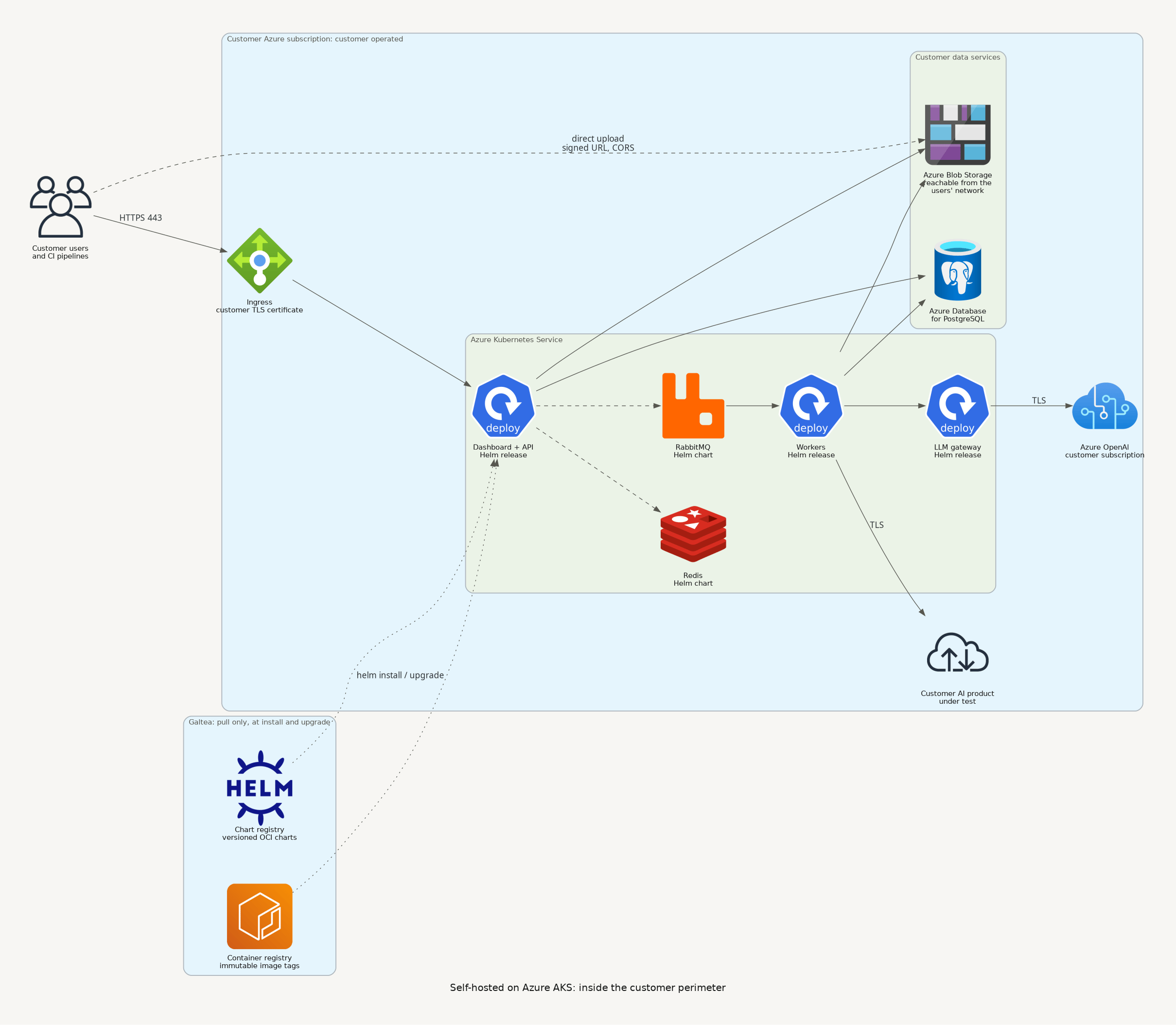
Both diagrams are generated from code, so they stay in step with the architecture. PNG for documents, SVG for slides. Private tenant on AWS: the managed target, a dedicated account, private VPC across three availability zones, controlled egress with a hostname allowlist, and the optional VPN-only entry path.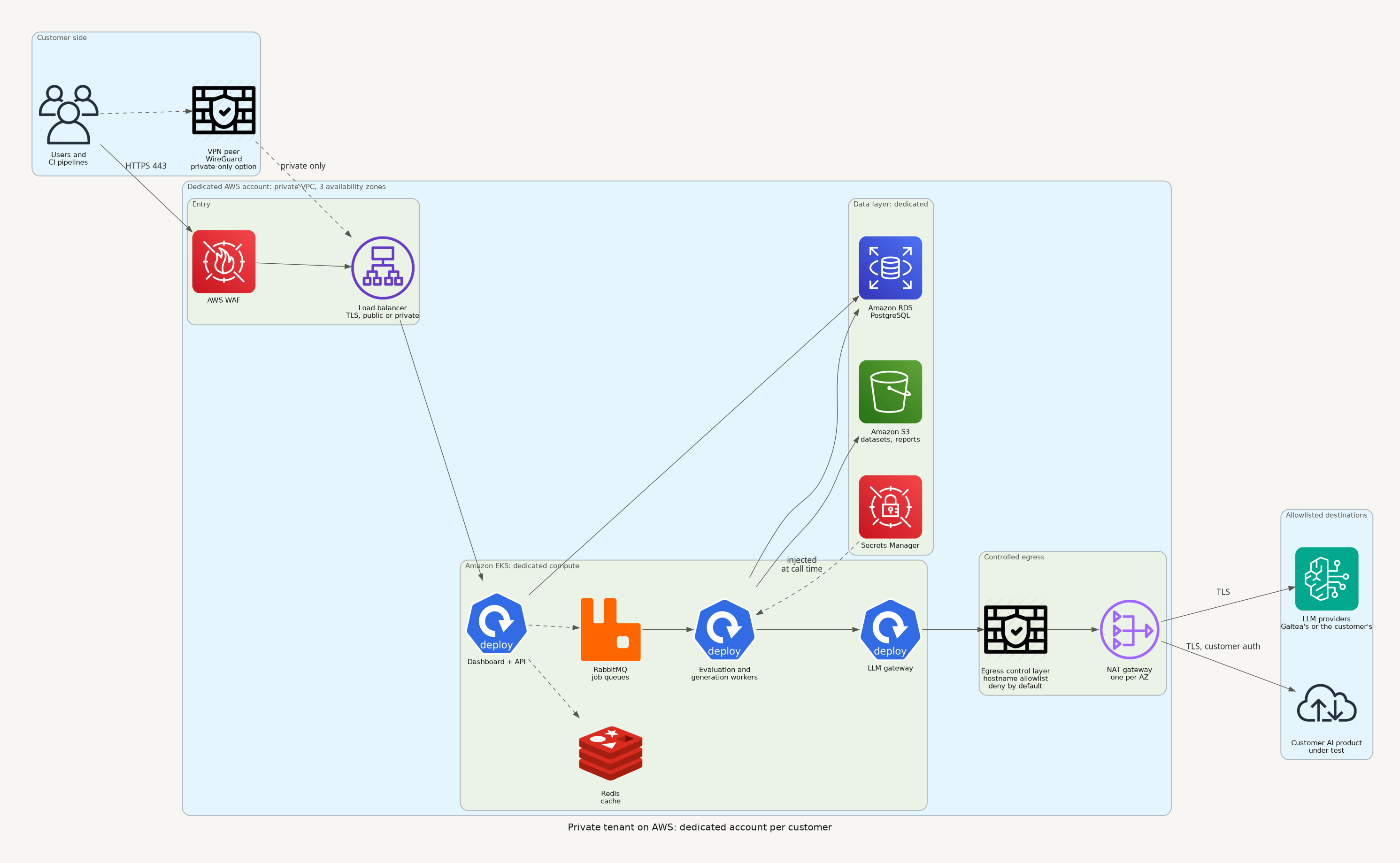
Private tenant on AWS
Self-hosted on Azure AKS
AWS notes
- This is the reference implementation. Private tenants are deployed as a dedicated AWS account per customer, with a private VPC across three availability zones.
- Outbound traffic leaves through an egress control layer with a destination allowlist and one NAT gateway per availability zone. Fixed egress IPs are available on request. See Model 3 (Private tenant).
- Private connectivity can use VPC peering or private-link endpoints instead of internet egress when your own network is on AWS. For any other cloud or an on-premise network, the VPN is the private path.
Azure notes
- The self-hosted package is the validated Azure path. It deliberately avoids AWS-only building blocks so it installs on a plain AKS cluster.
- Workload identity is the recommended way to give the platform access to Blob Storage, so no storage key is stored in the cluster. Key-based access with a connection string also works. The deployment package includes the step-by-step setup notes for both.
- Blob Storage reachability is the single most common setup mistake. File uploads go
directly from the user’s browser to the blob endpoint using a signed URL. If the network
your users sit on cannot resolve or reach that endpoint, or CORS is not configured for a
cross-origin
PUTfrom your dashboard origin, creating a test with an attached file appears to hang with no obvious error. Both must be configured before go-live. - Azure OpenAI model availability differs by region and subscription. If your approved model set differs from the package default, the gateway configuration and the per-service model settings are adjusted to match. Regulated environments that allow only an approved subset are a normal case.
Google Cloud and other Kubernetes
No architectural blocker is known. The work to scope per deployment:- Object storage: either Google Cloud Storage through its S3-compatible interface, or a self-run S3-compatible store.
- Workload identity: mapping the platform’s service accounts to your mechanism.
- Ingress and certificates: your controller, your certificates.
- LLM provider: Vertex AI is supported through the gateway.
- A test cycle in your environment before go-live.
The LLM provider is a separate decision
The gateway is provider-agnostic by design, and Galtea’s own platform routes across Azure OpenAI, Vertex AI, OpenAI, Bedrock and others, with automatic failover between them. What matters for your deployment is narrower:- The self-hosted package ships configured for Azure OpenAI out of the box: every model the default routing table points to is an Azure deployment, and it expects an EU data-zone endpoint. Any model provider can be connected to Galtea through the LiteLLM gateway configuration, and the other providers are already present in the shipped configuration as commented-out entries you can enable.
- This holds regardless of which cloud you deploy on. An installation on AWS or GCP still calls Azure OpenAI for its models, which is only a cross-cloud HTTPS call.
- Consolidating production traffic on one primary provider is the recommendation, because it keeps one set of data-processing terms, one region story and one quota to manage instead of several.
- Authenticate by identity where the provider supports it rather than by long-lived API key.
- If your approved model set differs from the package default, the routing table and the per-service model settings are adjusted to match. Regulated environments that allow only an approved subset are a normal case.
European models, EU-only processing, and the difference between them
Customers arrive with one of two requirements, and they are not the same. Getting them mixed up is how a deployment passes one review and fails the next.- “Our data must not leave Europe.” A requirement about where the processing happens. Any provider satisfies it if the model is served from an EU-resident deployment.
- “Our providers must be European.” A requirement about who the processor is, usually driven by concern about non-EU legal reach over a US-headquartered company. An EU region of a US provider does not satisfy this, even though the bytes never leave Europe.
Routes 1 and 2 are in production today.
Route 3 has not been deployed for anyone yet: no customer has needed a
European operator rather than a European model on an EU-resident platform, so it would be
scoped with you rather than switched on. Raise it early if it is a hard requirement, because it
means selecting and contracting an operator, not changing a routing table. Route 4 is available
in a private tenant or a self-hosted install and is the only one where no third party processes
your data at all.
What an EU-only tenant looks like in practice. Every route is
pinned, and pinned differently depending on what the provider offers:
- Most traffic goes to an EU data zone deployment, with credentials that exist only for that deployment.
- Anthropic models go through EU cross-region inference profiles, and where a model is only offered as a single-region id, the id used is the EU-region one, noted as such so nobody later mistakes it for a cross-region profile.
- Google models are split across two EU pins: a specific European region for most, and the EU multi-region residency endpoint for newer models that region does not serve yet. Neither is the global endpoint.
- A European model, Mistral Large, is available on the same EU data zone.
- The gateway also publishes the global model name and routes it to the EU deployment, so a service that asks for the global variant still gets the European one instead of silently leaving the region.
- EU-pinned models are separate entries in the gateway, named distinctly from the default ones, with their own provider credentials. Selecting an EU route is selecting a different route, not trusting a flag.
- Endpoints with no guaranteed processing location are excluded for enterprise tenants. Some providers offer a cheaper global endpoint that gives no residency guarantee; it is not used.
- The allowed set can be restricted so that no service can fall back outside it.
Cloud-independent guarantees
Regardless of target:- No cloud-provider feature is required for the platform to function. Autoscaling, managed secrets and managed certificates are all optional improvements.
- Workload identity rather than stored credentials wherever the cloud offers it, so no long-lived key for storage or secrets sits in the cluster. This is the expected configuration in every Galtea-operated deployment.
- The charts are published, versioned artifacts. They install with plain Helm on a bare cluster, and with ArgoCD if you run GitOps.
- One container image set serves every target. There is no per-cloud fork of the product.