

This guide uses the Dashboard. To create the same connection in code, see the SDK streaming example or the request body in the REST API reference, which the CLI sends too. Every field is listed in Streamed Replies.
Prerequisites
- A Product in the Galtea Dashboard.
- The URL of your agent, and a way to call it with
curl. - The basics of an Endpoint Connection. If you have never made one, read Direct Inferences and Evaluations from the Platform first.
Does Your Agent Stream?
Call your agent once withcurl. The -N flag prints each piece as it arrives, and -i shows the response headers:
Content-Type header of the response:
The header only helps you choose. Galtea reads the stream with the Format you set, whatever the header says. Some servers send NDJSON as
text/plain: pick NDJSON when each line is one JSON value.
Most agent stacks stream when you ask them to: the OpenAI and Anthropic APIs with "stream": true, a Google ADK server at /run_sse, and a Vercel AI SDK route that returns a UI message stream. If your agent can answer both ways, a JSON reply is the simpler choice. Pick streaming when the stream is the only way your agent answers, or when you want to test the exact endpoint your users call.
How Galtea Reads a Stream
Galtea reads the whole stream and turns it into one object. Your Output Mapping then reads that object with JSONPath, the same way it reads a JSON reply. Take this invented stream. An in-house agent opens a conversation, sends its answer in two pieces, lists the passages it used, and ends:Stream
Assembled object
textis the answer: the text of the chunks that give text, joined. In Last mode it is the text of the last such chunk.byEventkeeps every chunk, grouped by its event name, in the order they came. It is a list for each event, so[0]is the first chunk of that event.finalis the last chunk whose data is a JSON object or list. Agents often put the conversation id or a summary there.
Example 1: A Preset
A preset fills every stream setting for a known agent stack. This example uses an agent built on the OpenAI Responses API, for example with the OpenAI Agents SDK, that forwards its stream events. The agent also adds one event of its own,retrieval.results, with the passages it found.
Stream
1
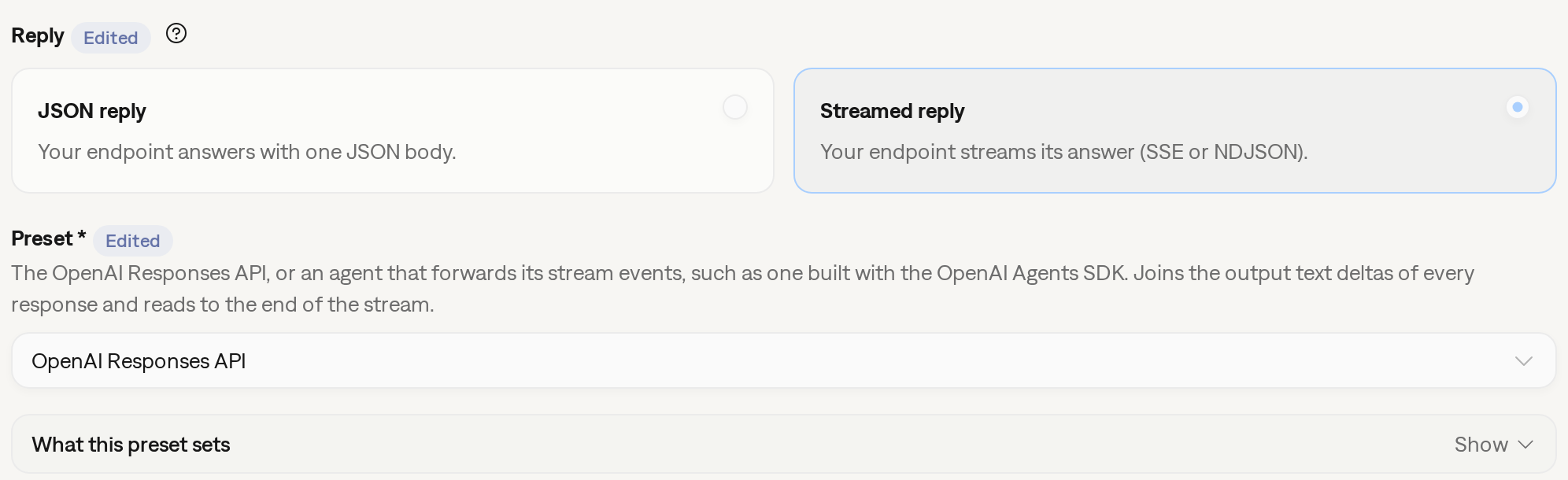
Choose the reply type and the preset
In the connection form, set Reply type to Streamed reply. In Preset, choose OpenAI Responses API. Open What this preset sets to see its settings: it names each event from the
type field and takes text only from response.output_text.delta events.On a Conversation connection, the form also sets the Output Mapping to output: $.text when it still holds the default.2
Map the answer, the retrieved context and the conversation id
Galtea builds this object from the stream:Add two keys next to The event name
Assembled object
output:Output Mapping
retrieval.results has a dot, so the path uses the bracket form. See The Conversation Id.3
Send the id back on the next turn
On the first turn there is no id yet, so send it only when it exists:
Input Template
Example 2: Custom Settings
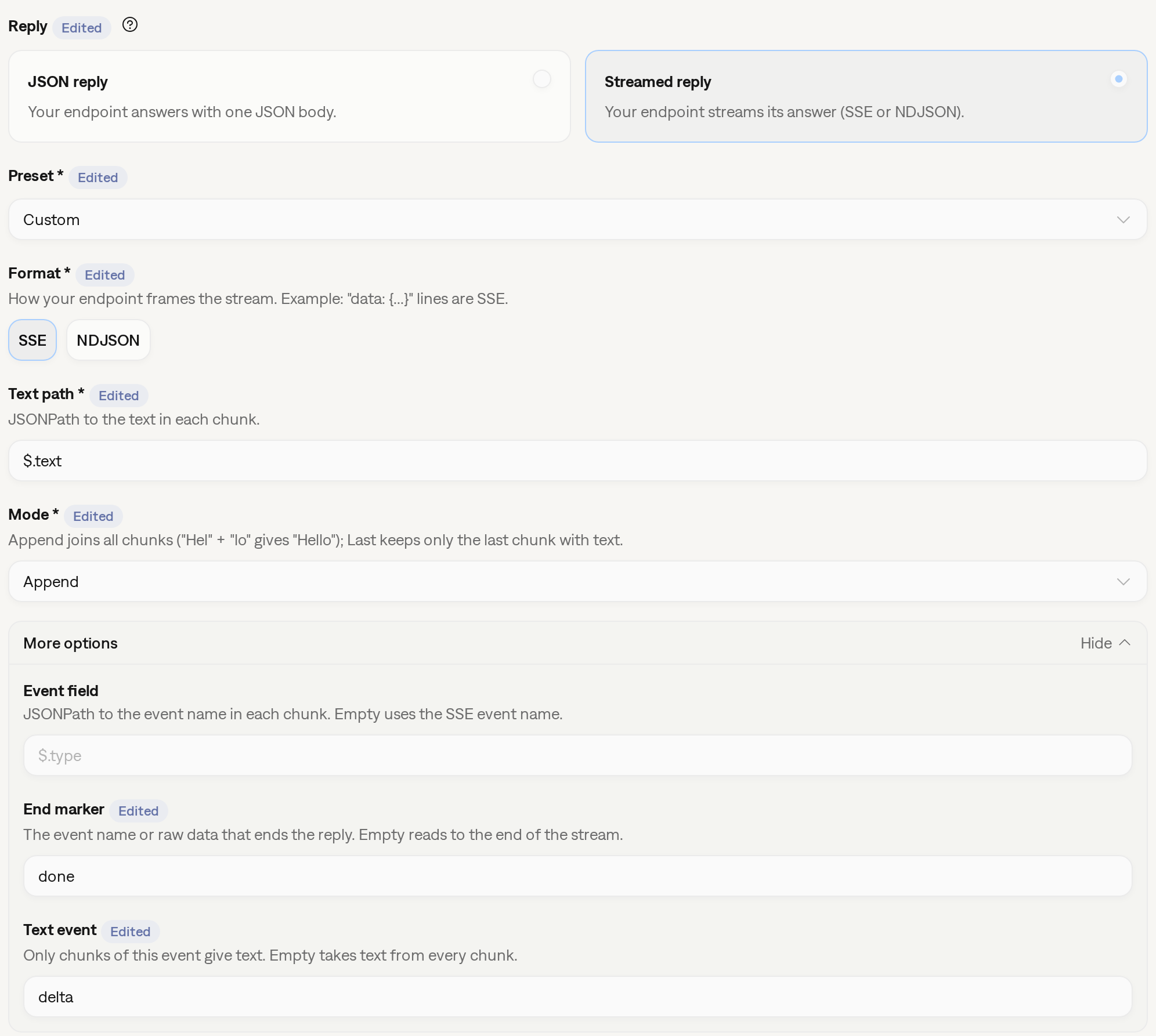
Use Custom when no preset matches your agent. This example reads the in-house stream from How Galtea Reads a Stream.1
Set the stream settings
Set Reply type to Streamed reply and Preset to Custom. Then fill in:
Open More options:
When you switch to Custom from a preset, the form keeps that preset’s settings as a start. Clear the ones your agent does not need. The form also keeps the preset’s error event, and has no field for it yet.
2
Map the fields
Output Mapping
3
Send the id back on the next turn
Input Template
The Conversation Id
Most agents keep a conversation by an id: a thread id, a session id, a response id. Galtea stores the id your agent returns and sends it back on the next turn as{{ session_id }}. The form fills only output: $.text, and only on a Conversation connection, so add the session_id key yourself.
Find the chunk that carries the id in your stream, then pick where to read it:
$.byEvent['<event>'][0].<path>when one event names the id, often the first one. Example 2 reads$.byEvent['conversation.started'][0].conversation_id.$.final.<path>when the last event carries it. Example 1 reads$.final.response.id.
{% if session_id %} branch in the Input Template covers the first turn, when Galtea has no id yet.
Test the Connection
Click Test Connection at the bottom of the form. Galtea calls your agent with sample values, reads the stream as a real turn would, and shows two tabs:- Raw Response shows the assembled object.
byEventstarts closed: open it to see each event and to copy the paths you need. - Extracted Fields shows the value of each Output Mapping key. A required key that matched nothing says “Required — no value extracted. Check your JSONPath expression.”
Test Connection sends a random
session_id, so the {% if session_id %} branch of your Input Template is taken, and your agent receives an id it does not know. In a run, the first turn has no id. If your agent rejects an unknown id, test with a template that leaves the id out, then put it back.Troubleshooting
Not Supported
Galtea reads streams over HTTP only, as SSE or NDJSON. gRPC and WebSocket agents are not supported today. If your agent speaks one of them:- Put a small adapter in front of it. It takes Galtea’s HTTP request, calls your agent, and answers with one JSON body or an SSE stream. Galtea then connects to the adapter like to any agent.
- Check for a gateway you already run. gRPC services are often exposed through gRPC-Web, Connect or a JSON transcoding gateway (for example Envoy), which already speak HTTP and JSON.
- Run the conversation yourself. Call your agent from your own code and send each turn to Galtea with the SDK. See Run Dataset-Based Evaluations.
Learn More
Streamed Replies reference
Every stream field, the presets and their sources, and the limits.
Direct Inferences Tutorial
Attach the connection to a version and run an evaluation.
SDK: create a streaming connection
The same connection in Python.
REST API: create a streaming connection
The request body with a preset and with
CUSTOM settings, for the API and the CLI.